

For Microsoft Flight Simulator 2024
Every flight you fly,logged and graded by itself.
Flyt Logbook records each flight from block to block, shows it live, and keeps a history with a route map, a replay and a note for every phase. Install it and fly. There is nothing to set up.
PC and Xbox · VR and gamepad · 6 languages
- OUT13:12Z/
- OFF13:23Z/
- ROTATE152 kt/
- TOC13:44Z/
- CRUISEFL380/
- TOD14:53Z/
- ON15:15Z/
- TOUCHDOWN−142 fpm/
- IN15:18Z/
- BLOCK2:06/
- DISTANCE672 NM/
- Records itself. Out, off, on and in times, airports, aircraft and track, with no button to press.
- Grades the flight with evidence, not opinions: “bank of 28° at 13:27Z”.
- Plans from SimBrief, the MSFS EFB or the avionics, and still works with no plan at all.
- Your history stays yours: nothing is sent anywhere unless you choose to.
Features
Everything the flight leaves behind
Nine things the add-on does so you do not have to.
Automatic logbook
Block-to-block times (out, off, on, in) in UTC and local time, airports, aircraft, registration, night time and landings.
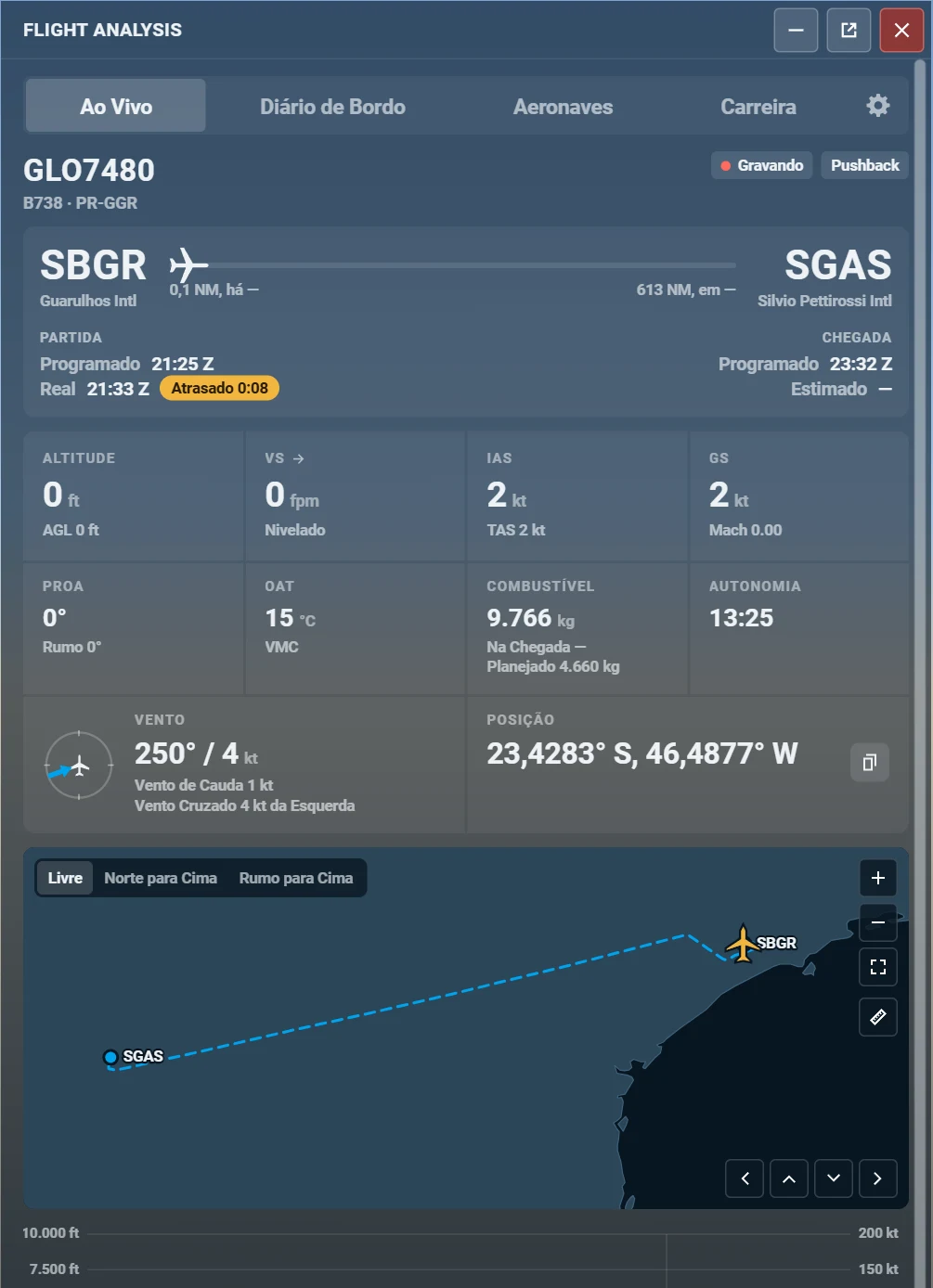
Live flight card
Origin to destination, progress, scheduled against actual times, altitude, speeds, wind and fuel, in a window on the toolbar.
Route map and replay
Your track coloured by altitude, a replay at x10, x60 or x300, and a speed and altitude graph with the flight phases marked.
A note for each phase
Taxi, takeoff, stabilised approach, landing, passenger comfort and fuel, each with the numbers and moments behind it.
Flight plan, your way
SimBrief when you ask for it, the MSFS EFB plan, the avionics plan, or the geography when there is no plan.
Career totals
Hours, landings, distance, airports, countries, hours per aircraft and your records, such as the smoothest landing.
One window, from pushback to the history
The add-on lives on the MSFS 2024 toolbar. A recorder runs behind it, so flights are logged even with the window closed.
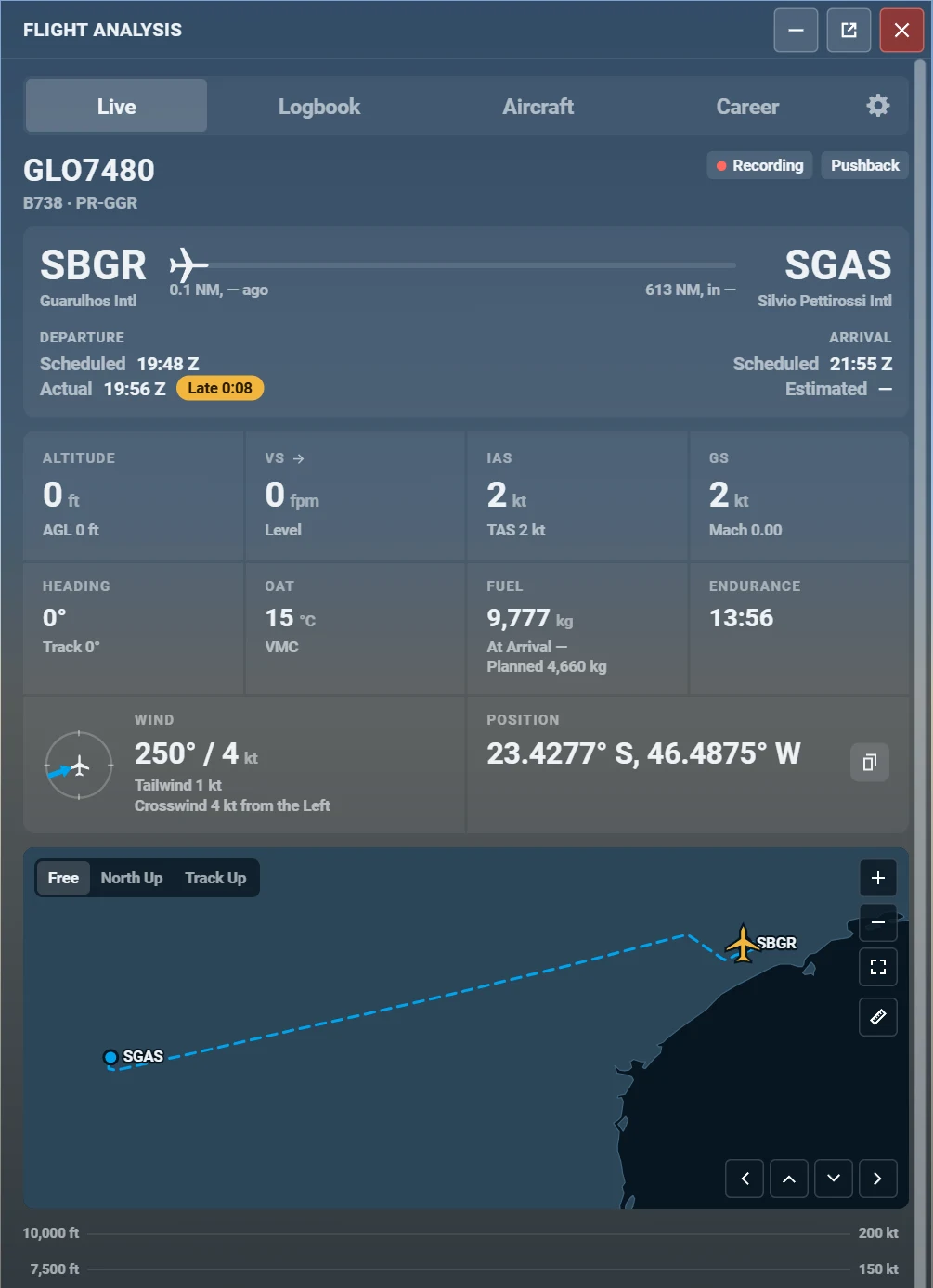
01 · Live
The flight as it happens, in one glance
Open the card in the air and read the whole flight without hunting for numbers.
- Origin, destination and a progress bar with the aircraft
- Scheduled against actual times, with the delay
- Altitude, vertical speed, IAS, ground speed, heading, OAT, fuel and wind
- A map that follows the aircraft
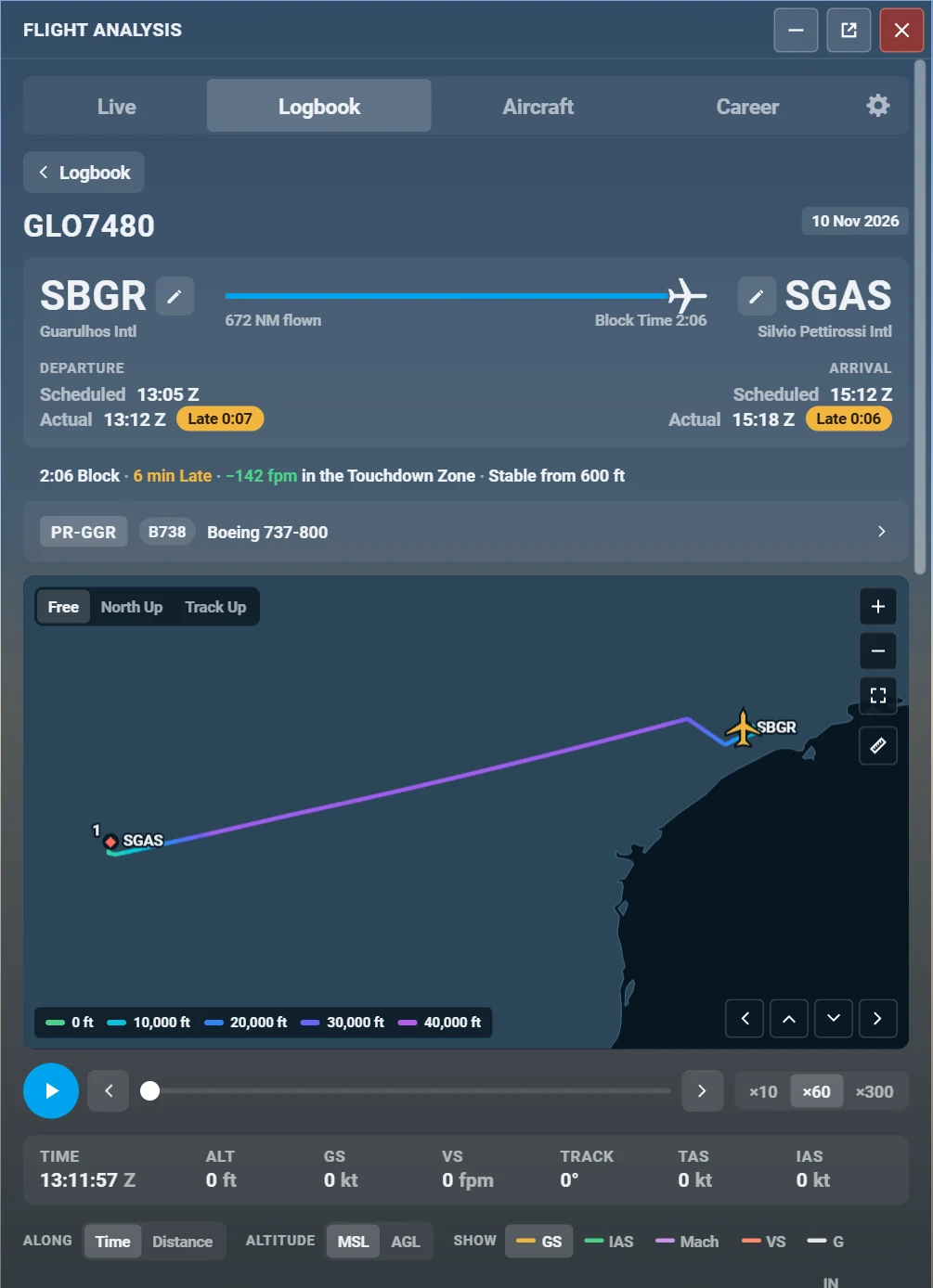
02 · Replay
Fly it again, coloured by altitude
Every flight keeps its route. Watch it back at x10, x60 or x300 with a cursor that reads out the instruments.
- Track coloured from low to high, planned route dashed
- Play, pause, step and jump along the flight
- Time, altitude, ground speed, vertical speed, track, TAS and IAS at the cursor
- Flight phases marked on the graph: OUT, OFF, TOC, TOD, ON, IN
03 · Career
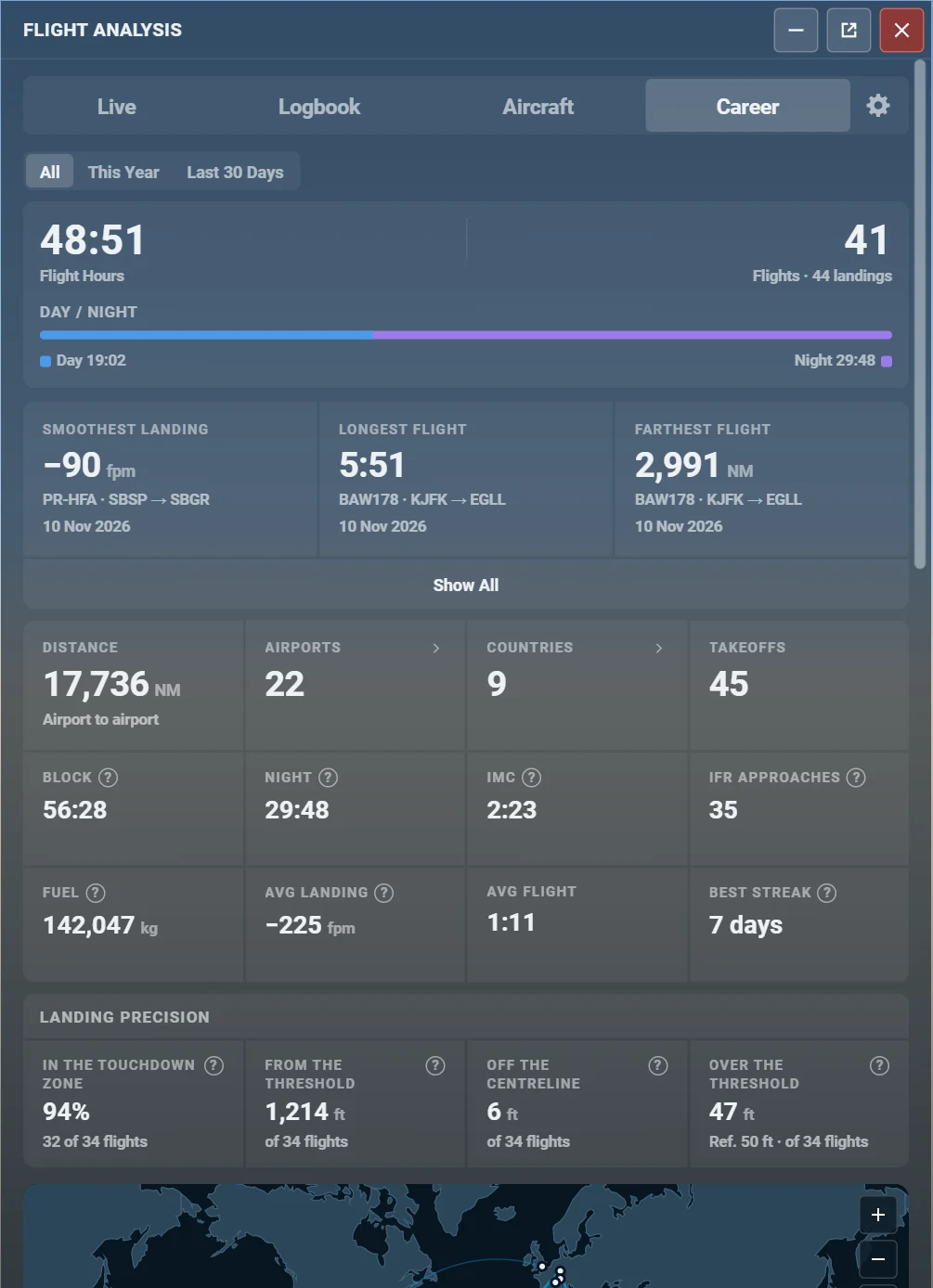
Your whole flying life, added up
Hours, flights and landings, day and night, with the records you set along the way.
- Smoothest landing, longest and farthest flight
- Airports, countries, distance, fuel and IFR approaches
- Landing precision: touchdown zone and distance from the threshold
- A map with all your flights
Screens
Every screen, up close
Real screens of the add-on, captured from its interface preview. Tap any one to enlarge it.
Interface preview with example flights. Not a recording of your data.
The flight card, updating at most once a second.
Example flight
A note for every phase, with the proof
Flyt Logbook judges the conditions, not the aircraft type. Where it has no data for your aircraft, it measures stability and trend and never a limit it made up. Every note says what it saw, and when.
Taxi
Good22kt
fastest taxi speed
A smooth taxi, at most 22 kt on the straights.
- 13:19 Z Taxi at 22 kt
- 13:20 Z Turn taken at 11 kt
Takeoff
Good152kt
at rotation
A clean takeoff: rotation at 152 kt, 2.6° of pitch per second.
- 13:22 Z Rotation at 152 kt
- 13:23 Z Bank of 0.6° at liftoff
Stabilised approach
Fair600ft
stable from this height down
Stable only from 600 ft, in time for the 500 ft gate.
- 15:13 Z Sink rate of 1,140 fpm
- 15:14 Z 0.6° above the path
Landing
Good−142fpm
at touchdown
A smooth touchdown at −142 fpm.
- 15:15 Z Touchdown at −142 fpm
- 15:15 Z Load of 1.17 g
Passenger comfort
Good86/ 100
comfort score
Two moments were felt in the cabin.
- 13:27 Z Bank of 28°
- 15:07 Z Turbulence of 0.31 g
Fuel
Needs a plan—
used against the plan
Compared with the plan when there is one. With no plan, nothing is made up.
- — Planned fuel from SimBrief or the EFB
Notes are for fun and self-improvement in the simulator, not real-world training or certification.
Make it yours
Themes, text size, opacity and units are preferences. Nothing is hard-wired to one way of reading a flight.
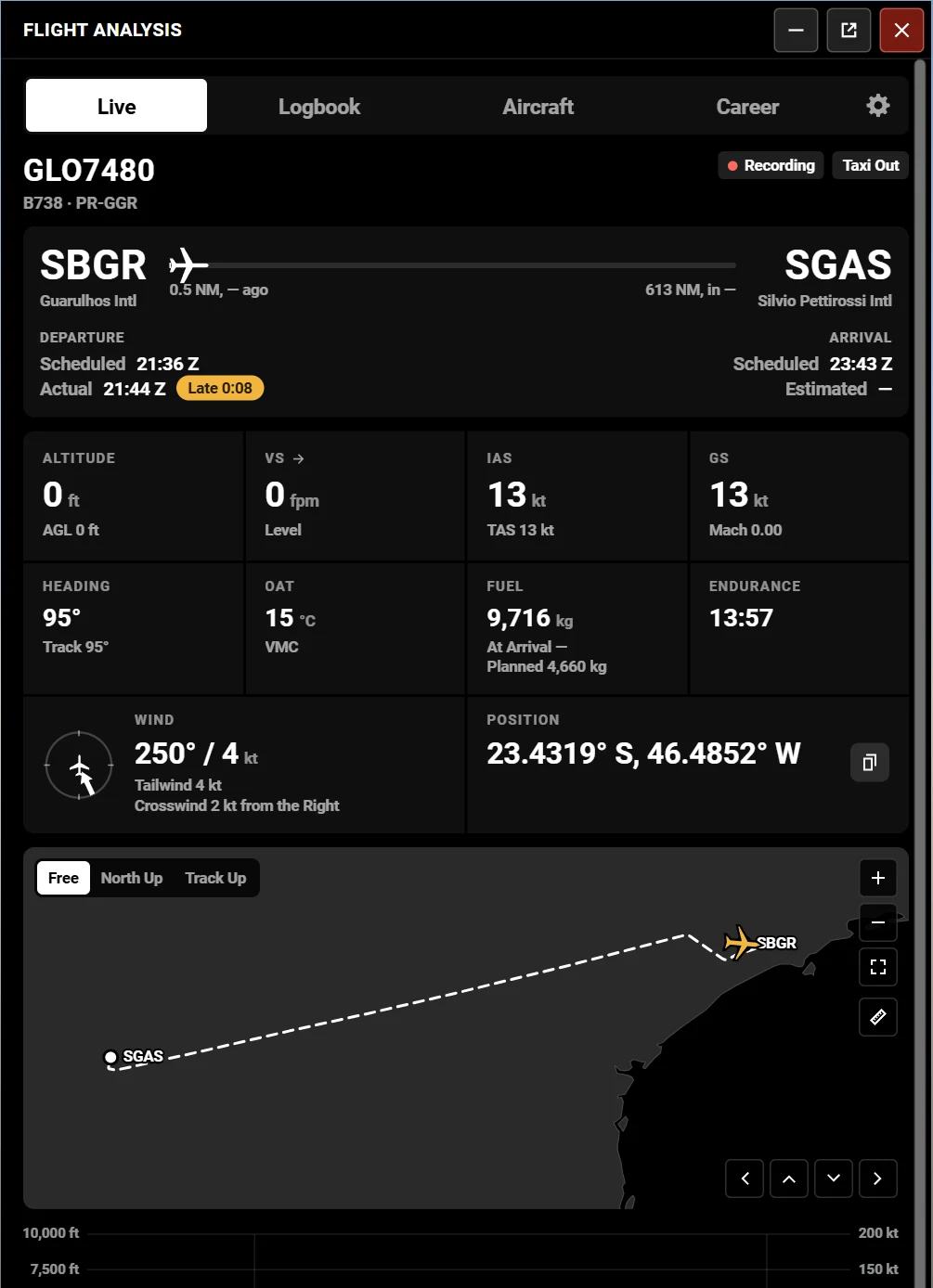
Blue or black theme
Two themes, with the opacity of the glass and the text size set to your taste.
Six languages
English, German, Portuguese, French, Spanish and Italian, with dates and numbers in the language’s format.
Your units
Feet or metres, knots or km/h, NM or km, kg or lb, °C or °F, hPa or inHg, UTC or local time.
How it works
- 01
Install and fly
Add Flyt Logbook to your sim and fly as usual. There is nothing to configure and no flight to start or stop.
- 02
Open it from the toolbar
Watch the live card in the air, then read your notes on the ground. After the last landing, the end-of-flight report can open by itself.
- 03
Keep the history
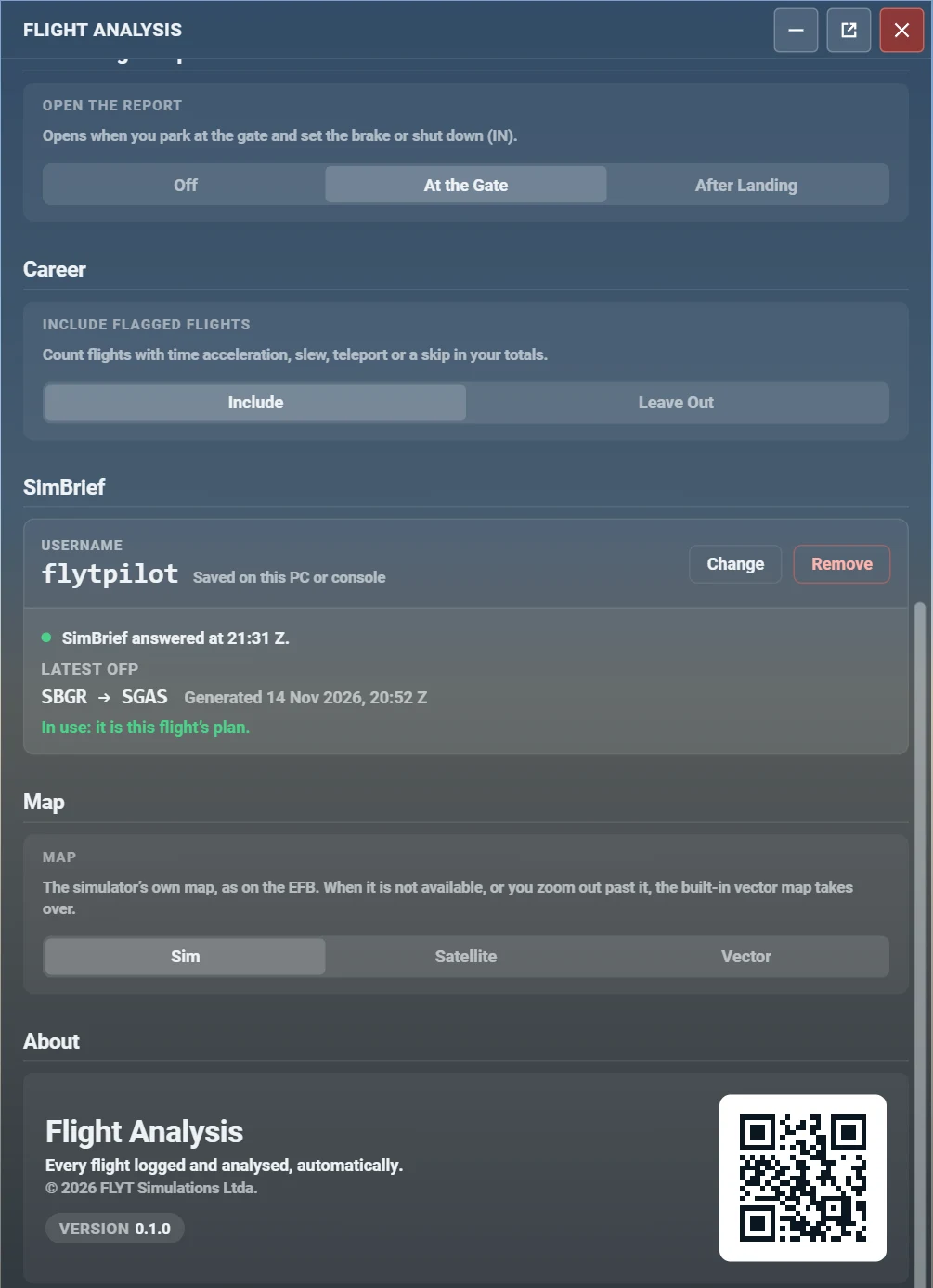
Every flight stays in your logbook, with its map, replay and notes. Link SimBrief if you like, or skip it.
Pilot area
Your logbook in the browser
Your pilot account keeps your flights on the web: open your logbook anywhere, on a big screen, between sessions. Reinstall the sim or format the PC, connect again and your history comes back. The sync is optional and starts only when you choose it.
The demo shows an example flight. No account needed.
- Sign in to see your flights, map, graph and notes
- Your career totals across every flight
- Connect your simulators with a code, and disconnect any of them
- Delete any flight whenever you want
Built for how you fly
MSFS 2024
A native add-on that records with a standalone module, so it never waits on the window.
PC and Xbox
Designed for both platforms. A few things differ, such as CSV export being PC only.
VR and gamepad
Every control can be reached with a gamepad, and the window is readable in VR.
6 languages
English, German, Portuguese, French, Spanish and Italian.
Light on the sim
Recording is built to avoid hitches. Nothing is saved at touchdown or takeoff.
Offline map
The world map is part of the add-on. No tiles to download.
Frequently asked questions
What is Flyt Logbook?
An add-on for Microsoft Flight Simulator 2024 that works as an automatic flight logbook. It records each flight block to block, shows it live in a toolbar window, and keeps a history with a route map, replay, graph, a note for each phase and your career totals.
Do I have to configure anything?
No. Install it, fly, and the flight is in your logbook. SimBrief is optional.
Which languages are supported?
English, German, Portuguese, French, Spanish and Italian.
Which aircraft does it support?
Any aircraft. Notes are based on the conditions of the flight, not the aircraft type. When it has no data for an aircraft, such as a reference approach speed, it measures stability and trend and never a limit that it made up.